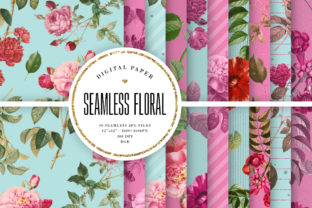
Floral Background 1: Versatile Digital Design Assets
Visual communication often hinges on the subtle details that frame a message rather than the message itself. Floral Background 1 serves as one of these foundational elements, offering a botanical aesthetic that can soften corporate messaging, enhance educational materials, or elevate personal creative projects. This digital download is not merely a static image; it is a dual-format resource package containing both an .EPS file and high-resolution JPEG/PNG files. Understanding the distinction between these formats and how they apply to different workflows is essential for maximizing the value of this asset.
The inclusion of multiple file types addresses a common friction point in digital design: compatibility. While a professional print shop requires vector data for large-scale output, a social media manager or hobbyist typically needs immediate raster compatibility. By providing both, Floral Background 1 bridges the gap between technical precision and accessible creativity, allowing users across the experience spectrum to utilize the same core artwork without needing advanced conversion tools or software.
Navigating File Formats for Different Workflows
To use this resource effectively, one must understand what is actually inside the download. The .EPS (Encapsulated PostScript) file is a vector-based format. Unlike standard photos, vectors are defined by mathematical paths rather than pixels. This means the floral elements can be scaled infinitely—from a business card to a billboard—without losing sharpness or becoming pixelated. For designers using Adobe Illustrator, CorelDRAW, or Affinity Designer, this file allows for deep customization. Colors can be shifted to match brand guidelines, individual petals can be rearranged, and elements can be isolated or removed entirely.
Conversely, the JPEG and PNG files are raster images composed of a fixed grid of pixels. These are universally compatible, opening instantly in web browsers, Microsoft Word, Canva, and mobile editing apps. The PNG format specifically supports transparency, which is invaluable when layering text over the background or placing the floral arrangement onto a colored surface without a white box appearing around the edges. The JPEG version provides a flattened, high-quality composite ideal for backgrounds where transparency is unnecessary. For users who do not own or know how to use vector software, these raster files ensure the asset is immediately usable right after purchase.
Priorities for Professional Designers and Marketers
For marketing professionals and graphic designers, the primary evaluation criteria for Floral Background 1 are flexibility and commercial viability. Time is often the most expensive component of a project. Creating custom botanical illustrations from scratch can take hours or days. Utilizing a pre-made vector asset significantly reduces production time while maintaining a bespoke appearance through modification.
A brand strategist might evaluate this background based on its adaptability to seasonal campaigns. Because the EPS file allows for color manipulation, a single floral design can transition from pastel spring tones to deep autumn hues with minimal effort. This consistency helps maintain brand recognition across varying marketing collateral. Furthermore, professionals prioritize clean vector construction. Poorly made vectors have overlapping anchor points or open paths that cause printing errors. High-quality digital downloads like this one are typically optimized for print production, ensuring reliable results when sent to commercial vendors for packaging, signage, or editorial layouts.
Educators and Non-Profit Communicators
Educators, administrators, and non-profit organizers often operate under different constraints than commercial designers. Budget limitations and varying levels of technical proficiency make ease of use and presentation quality paramount. For a teacher creating classroom worksheets or a coordinator designing an event flyer, the goal is visual engagement without a steep learning curve.
In this context, the PNG and JPEG files included in Floral Background 1 are likely the most valuable components. An educator does not need to manipulate vector nodes to create an inviting lesson plan header; they simply need to drag and drop a transparent PNG into their document editor. The priority here is speed and accessibility. The floral aesthetic also serves a functional purpose in educational settings, helping to delineate sections, reduce cognitive load through whitespace, and create a welcoming atmosphere that sterile, text-only documents lack. The reliability of having a pre-formatted image eliminates the frustration of searching for free clip art that may be low-resolution or legally ambiguous.
Creative Exploration for Hobbyists and Beginners
For hobbyists, journal enthusiasts, and those new to digital design, Floral Background 1 represents a learning tool and a source of inspiration. Beginners often struggle with the "blank canvas" syndrome. Having a high-quality starting point allows them to experiment with composition, typography pairing, and color theory without the pressure of drawing complex organic shapes from memory.
Hobbyists might prioritize the artistic potential over commercial utility. A scrapbooker might print the JPEG at home for physical albums, while a digital artist might import the EPS into iPad software like Procreate (via conversion) or Vectornator to trace over and learn how botanical curves are constructed. For this audience, the value lies in the long-term usefulness of the asset as a practice aid. The dual-format nature means they can start with the simple PNG files today and grow into utilizing the EPS vector file as their skills develop, making the purchase relevant at multiple stages of their creative journey.
Evaluating Suitability for Your Specific Project
Determining whether Floral Background 1 aligns with your current needs requires an honest assessment of your project scope and technical environment. Consider the following practical factors before integrating this asset:
- Output Size Requirements: If your final deliverable exceeds standard screen resolution or A4/Letter print size, you must verify access to vector editing software to utilize the EPS file. Raster files have a maximum effective size before quality degrades.
- Customization Needs: If the specific color palette or arrangement of Floral Background 1 does not perfectly match your vision, assess whether you have the skills to modify the vector file. If not, determine if the existing raster version is "close enough" to serve your purpose.
- Software Ecosystem: Ensure your current tools support the provided formats. While PNG/JPEG are universal, EPS compatibility varies. Some free or entry-level tools may not import EPS files correctly, necessitating a reliance on the raster versions only.
- Licensing and Usage: Always review the specific license terms associated with the digital download. Understand the distinction between personal use, commercial use, and extended licensing, especially if you intend to incorporate the background into products for resale or client work.
Balancing Quality and Efficiency
Ultimately, the decision to use Floral Background 1 comes down to balancing quality requirements with workflow efficiency. For a small business owner creating Instagram stories, the instant availability of the PNG file offers unmatched speed. For a packaging designer creating a luxury cosmetic box, the scalability of the EPS file ensures the intricate floral details remain crisp at any dimension. Both users benefit from the same product but extract value through different mechanisms.
This versatility is what defines modern digital assets. They are no longer single-purpose items but adaptable resources that mold to the user's intent. Whether you are seeking to streamline a professional workflow, enhance an educational presentation, or explore digital artistry, understanding the technical and practical applications of these file formats ensures that Floral Background 1 serves as a reliable foundation for your visual projects. By matching the file type to your specific skill level and output goal, you transform a simple digital download into a strategic design advantage.