Floral and Crescent Moon Bundle: A Practical Guide for Creators
The Floral and Crescent Moon Bundle has quickly become a staple resource for designers, crafters, and small business owners looking to add a touch of whimsy and elegance to their projects. This collection combines the organic softness of botanical illustrations with the celestial mystery of crescent moons, creating a versatile aesthetic that bridges the gap between nursery decor and sophisticated stationery. Whether you are designing baby shower invitations, planning a wall art series, or creating custom apparel for children, this bundle offers the visual assets necessary to bring those visions to life.
However, owning high-quality assets is only half the battle. Many creators, from beginners to seasoned professionals, often stumble not because the design is lacking, but because they misunderstand file formats, overlook licensing nuances, or fail to optimize the artwork for specific mediums. To get the most value from this bundle, it is essential to approach it with technical awareness and strategic intent. Understanding exactly what you have downloaded and how to apply it correctly will save you time, prevent costly printing errors, and ensure your final products look professional.
Understanding the File Formats Included
One of the most common mistakes when purchasing digital design bundles is ignoring the specific file types provided. The Floral and Crescent Moon Bundle includes five distinct formats: EPS, JPEG, PNG, PDF, SVG, and DXF. Each serves a unique purpose, and using the wrong one can lead to pixelated prints or incompatible software issues.
- SVG Files: These are your primary choice for cutting machines like Cricut or Silhouette. Because they are vector-based, they scale infinitely without losing quality. Use these for vinyl decals on baby clothes, tumblers, or party signage. Do not use JPEGs for cutting; the machine cannot read the cut lines effectively.
- EPS Files: Essential for professional designers using Adobe Illustrator or CorelDRAW. If you plan to modify the floral elements, change colors, or combine the moon with other vectors for commercial branding, start here. This format preserves editability that raster files cannot offer.
- PNG Files: High-resolution PNGs with transparent backgrounds are perfect for sublimation printing, digital planners, or overlaying onto colored cardstock. Ensure you are working at 300 DPI for any print application to avoid jagged edges.
- PDF Files: Often overlooked, these are ideal for direct printing on standard home printers or professional print shops. They maintain vector crispness for text-heavy items like calendars or formal invitations.
- DXF Files: Specifically designed for older versions of cutting software or specialized CNC machines. Keep these as a backup if your primary SVG workflow encounters compatibility issues.
A frequent error occurs when users attempt to resize a low-resolution JPEG for a large-format wall art piece, resulting in blurry output. Always verify the resolution and file type before committing to a production run. For large nursery decor, rely exclusively on the EPS, SVG, or high-res PDF files included in the bundle.
Common Application Mistakes in Crafting and Apparel
When applying the Floral and Crescent Moon Bundle to physical products like baby clothes, birthday party supplies, or scrapbooking pages, material compatibility is critical. A design that looks stunning on a screen may fail during the heat press or printing stage if not adjusted properly.
For apparel, particularly baby clothes, intricate floral details can sometimes peel or crack if the vinyl is too thin or the heat settings are incorrect. When using the SVG files for iron-on transfers, consider simplifying extremely delicate lines within your cutting software. While the bundle provides high-fidelity vectors, reducing node count slightly can improve adhesion on stretchy fabrics without sacrificing the overall aesthetic. Additionally, always test print or cut on scrap fabric first. Colors on screen differ significantly from physical ink or vinyl, and testing prevents wasting premium materials on misaligned or discolored designs.
In scrapbooking and card making, layering is key to maximizing the bundle's potential. A common oversight is treating the illustration as a single flat image. By separating the floral components from the crescent moon in your editing software (using the EPS or SVG), you can create depth through shadowing and dimension. This transforms a simple invitation into a tactile experience. Failing to utilize layers often results in flat, generic-looking stationery that doesn't showcase the true quality of the artwork.
Navigating Licensing and Commercial Use
Before listing products featuring the Floral and Crescent Moon Bundle on Etsy or selling them at local markets, you must understand the usage rights. Misunderstanding licensing is perhaps the most significant risk for entrepreneurs and freelancers. Assuming that purchasing a bundle grants unlimited commercial rights can lead to legal complications or platform bans.
Check the specific license agreement included with your download. Typically, bundles allow for the creation of end products (like a printed calendar or a decorated onesie) but prohibit reselling the digital files themselves or sharing them in design communities. If you intend to use the artwork for mass-produced items or large-scale retail, verify if an extended license is required. Being proactive about compliance protects your business reputation and ensures you are supporting the original artist ethically.
Evaluating Quality Before Purchase
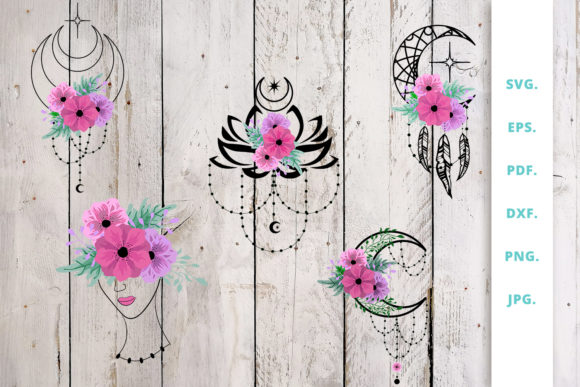
If you are still deciding whether this bundle fits your needs, look beyond the promotional mockups. Mockups are designed for presentation and may not reflect the exact line weight or color balance of the actual files. Instead, examine the product preview images closely or request a sample file if available.
Ask yourself practical questions: Are the lines clean enough for my intended cutting machine? Is the style consistent across all five designs in the set? Does the resolution support my largest planned project? For educators or bloggers creating digital content, ensure the PNG transparency is clean without white halos. For print professionals, confirm the color profile (RGB vs. CMYK) aligns with your printer’s requirements. Making these evaluations upfront prevents buyer’s remorse and ensures the Floral and Crescent Moon Bundle integrates seamlessly into your existing workflow.
Maximizing Versatility Across Projects
The true strength of this collection lies in its adaptability. To avoid creative burnout or repetitive designs, experiment with scaling and color manipulation. The crescent moon motif works beautifully as a standalone icon for minimalist business cards, while the full floral composition suits elaborate nursery wall art. By adjusting opacity, blending modes, or color palettes in your design software, you can make the same asset feel appropriate for both a vibrant children’s birthday party and a serene baby shower invitation.
Remember that efficiency comes from organization. Upon downloading, immediately sort the 5 EPS, 5 JPEG, 5 PNG, 5 PDF, 5 SVG, and 5 DXF files into clearly labeled folders. Naming conventions matter; renaming files to include descriptive tags (e.g., "FloralMoon_Nursery_WallArt_SVG") saves hours of searching later. Treating this digital asset library with the same care as physical tools will streamline your creative process and help you produce higher-quality work consistently.
Ultimately, the Floral and Crescent Moon Bundle is a powerful tool when used with intention. By respecting file specifications, testing applications thoroughly, understanding licensing, and organizing your assets wisely, you move beyond simple consumption to true craftsmanship. Whether you are a hobbyist making a gift or a professional fulfilling client orders, these mindful practices ensure your creations are as durable and beautiful as the designs themselves.