Animal Cut File with Floral: A Practical Guide to Selecting and Using Digital Designs
Incorporating an Animal Cut File with Floral elements into your creative projects offers a unique blend of organic charm and structured design. Whether you are creating custom apparel, designing nursery decor, or building a brand identity for a pet business, these hybrid designs bridge the gap between cute character art and sophisticated botanical aesthetics. However, the difference between a frustrating crafting session and a professional finish often lies in understanding the technical nuances of digital assets before you ever hit "print" or "cut." Many creators, from hobbyists to small business owners, overlook critical details regarding file formats, licensing, and vector integrity, leading to wasted materials and subpar results.
Understanding the Value of Multi-Format Bundles
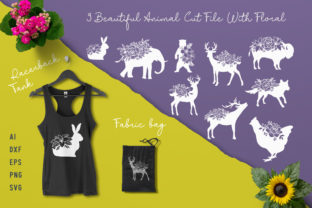
When evaluating high-quality files ready for print or web use, the inclusion of AI, EPS, PNG, and SVG formats is not merely a bonus; it is a necessity for workflow efficiency. A common misunderstanding among beginners is assuming that one file type serves all purposes. This assumption frequently leads to pixelated prints or jagged cuts on vinyl plotters. Each format within the ZIP file serves a distinct function that protects the quality of your final product.
- SVG (Scalable Vector Graphics): Essential for cutting machines like Cricut and Silhouette. Unlike raster images, SVGs maintain mathematical precision at any size, ensuring clean weed lines and smooth curves.
- PNG (Portable Network Graphics): Best for sublimation, direct-to-garment printing, and web use. These should always have transparent backgrounds to allow seamless layering over colored substrates or website headers.
- AI and EPS: Industry-standard vector formats required for professional editing in Adobe Illustrator or CorelDRAW. These allow you to modify anchor points, change colors individually, and resize without quality loss for large-format signage.
Ignoring these distinctions is a frequent error. Using a PNG for a vinyl cut, for example, forces the software to trace pixels rather than follow vector paths, resulting in unnecessary nodes and rough edges. Conversely, using an SVG for a photo-realistic print job may result in color banding if the design relies on gradients that vectors cannot replicate perfectly. Always match the file type to your specific output method to preserve the integrity of the Animal Cut File with Floral design.
Avoiding Sizing and Resolution Pitfalls
One of the most costly mistakes in DIY crafts involves improper scaling. While vector files (AI, EPS, SVG) are infinitely scalable, raster files (PNG) have fixed resolutions. A practical warning for those using these designs for merchandise: never upscale a standard-resolution PNG beyond its native dimensions. Doing so introduces interpolation artifacts that look blurry on fabric but might appear acceptable on a low-resolution screen. If you need a larger size for a tote bag or wall art, you must utilize the vector versions included in the set.
Furthermore, when working with intricate floral details attached to animal silhouettes, line weight matters significantly. A design that looks beautiful on a computer monitor may fail physically if the floral stems are too thin for your chosen material. Before committing to a full production run, test the minimum viable width of the delicate floral accents. Vinyl requires thicker lines than paper; what works for a greeting card might tear during weeding when applied to a t-shirt. Adjusting the stroke width in the vector file prior to cutting is a corrective step that saves both time and material.
Navigating Licensing and Commercial Use
Beyond technical specifications, legal compliance is an area where many entrepreneurs inadvertently stumble. Just because a file is downloadable does not mean it is cleared for every intended use. Misunderstanding licensing terms can jeopardize a small business. You must verify whether the Animal Cut File with Floral license permits commercial end-products versus digital redistribution. Most standard licenses allow you to sell physical items made with the design but strictly prohibit selling the digital file itself or uploading it to print-on-demand marketplaces without modification.
To avoid future complications, keep a record of the license agreement associated with your purchase. If you plan to use the design as a logo or trademark, ensure the license explicitly grants exclusive rights or modification permissions. Standard non-exclusive licenses typically prevent trademarking because other users have access to the same asset. For branding purposes, significant alteration of the original vector file is often required to create a distinct, protectable mark. Treating licensing as an afterthought rather than a foundational business decision exposes creators to unnecessary risk.
Optimizing Workflow for Mixed Media Projects
The versatility of this set makes it ideal for adding elements to various designs, yet this flexibility requires intentional planning. A better approach to using these files involves separating the animal and floral components during the design phase. Even if they appear as a single unit in the preview, professional results often come from deconstructing the composition. By ungrouping the elements in your vector software, you gain control over color palettes and placement.
For instance, you might want to match the floral accents to a specific brand color while keeping the animal neutral. If the file is flattened or poorly layered, this customization becomes impossible. High-quality AI and EPS files should have organized layers and grouped paths. If you find yourself manually tracing over a purchased file to separate elements, the asset quality is insufficient for professional work. Investing time upfront to verify layer structure ensures that the design remains adaptable across different media, from blog headers to embroidered patches.
Pre-Purchase Evaluation Checklist
To maximize satisfaction and usability, adopt a proactive evaluation strategy before acquiring any digital design asset. Rather than relying solely on the thumbnail image, consider the following practical checks:
- Node Count Inspection: Examine sample vectors for excessive nodes. Overly complex paths increase file size and can cause cutting machines to stutter or pause, affecting cut quality.
- Color Mode Verification: Ensure the files are provided in CMYK for print applications or RGB for digital use, or be prepared to convert them accurately to avoid color shifting.
- Compatibility Testing: Confirm that the SVG opens correctly in your specific version of cutting software. Older software versions sometimes struggle with newer SVG features like mesh gradients or complex clipping masks.
- Detail Clarity: Zoom in to 400% on the preview. Jagged edges or pixelation at high zoom levels indicate a traced raster image masquerading as a vector, which will yield poor physical results.
By approaching Animal Cut File with Floral selections with this level of scrutiny, you move beyond passive consumption to active, informed creation. The goal is to select assets that enhance your capabilities rather than limit them. When you understand the technical requirements of your tools and the legal boundaries of your business, these digital resources become powerful catalysts for creativity. Taking the extra moment to verify format suitability, test material compatibility, and confirm usage rights transforms a simple download into a reliable component of your professional or personal portfolio. Ultimately, success in digital crafting is less about the complexity of the design and more about the precision with which it is applied.